VERN'S COMPUTER
..
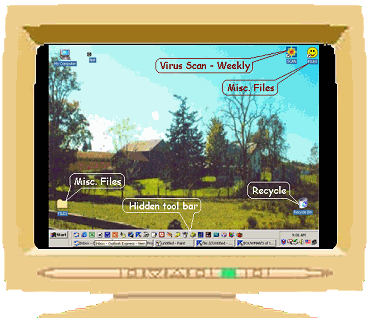
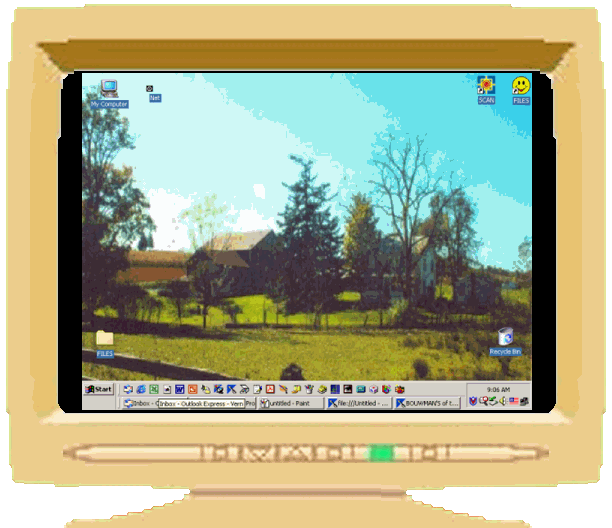
These set of notes are meant to advise others why items from this web sit might not appear correctly.  All persons have the right to have their computer settings as they wish. Below is how my computer (PC) appears when i am working at it, with the hidden tool bar showing.  The desktop photo is of my great great grandfathers home he built north of Mifflinburg, PA in 1856. .................................................NEXT NOTE:


..
..
...
..

1. Smile face has short cut to Games and other files used quite often.
..
2. File folder holds pictures received by e:mail that i keep for a while.
..
3. Hidden tool bar, See Description
..
..
..
..........................................NEXT NOTE:

..
..
..
..
..

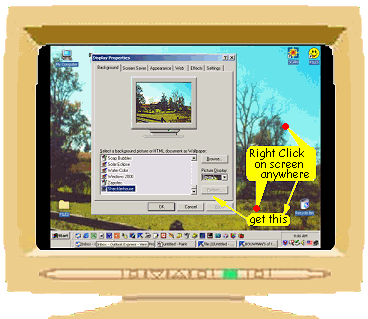
Vern's Screen area is set at 800 pixels wide by 600 pixels. a little smaller than the 640 x 480 allowed for persons with very small monitors.  If the 640 x 480 is a must, my pictures may go beyond the screen with out a scroll bar, which i am sorry for.  Others should really like the 800 x 600 setting.  You can set it with your desk top showing, right clicking your mouse on it where a menu will appear.  Click on Properties, "Display Properties" will appear..............................NEXT NOTE:
..
..
..
..
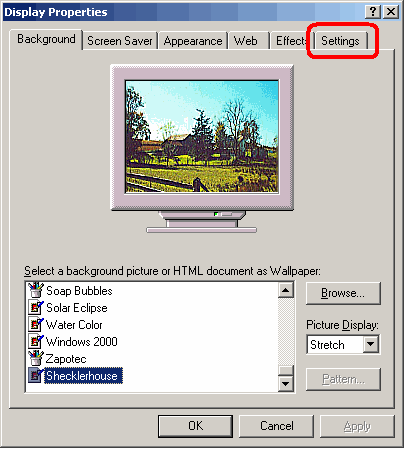
Click on
"Settings"
..
NEXT NOTE:
 
..
..

..

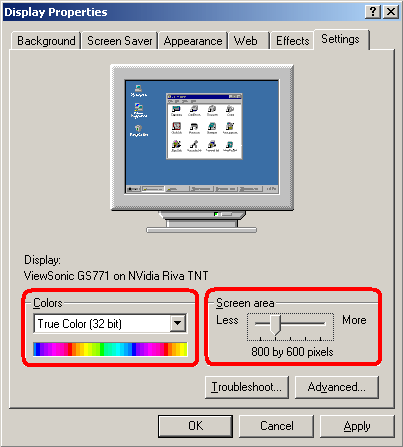
Here on "Setting",
notice that
colors is set to
True Color (32 bit)
....
and
....
Screen area
has 5 settings
mine is at
800 x 600
....
HOME
..